Markup bridge

A Confluence Cloud app that exports pages to Markdown, AsciiDoc, reStructuredText, Typst and LaTeX, and imports those files back. Use it to keep documentation in Git, edit pages in your own editor, publish with a static site generator, or move content between sites.

Coming soon to the Atlassian MarketplaceDocumentation

Export

On any page, open the ••• menu and choose Apps › Markup: Export…. Pick a format and whether to include child pages, and a zip downloads to your computer.

One file per page
Onboarding.md
Folders that follow the page tree
Engineering/
Images and attachments, next to their page
_attachments/
Notes on how to render the files
README.txt
A style file, for LaTeX and Typst
confluence.sty

Up to 500 pages and 500 MB of attachments per export.
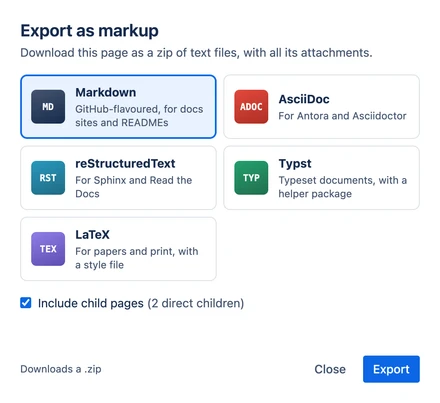
The export dialog: five formats to choose from, an option to include child pages and an Export button
Exporting a page and its child pages

Import

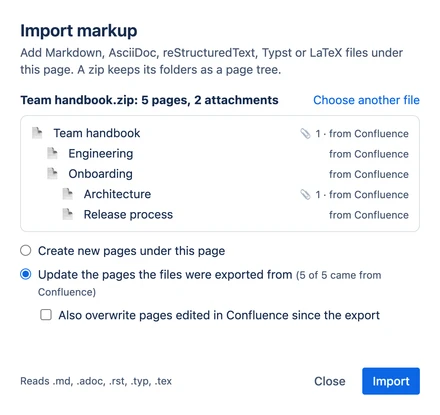
Choose Apps › Markup: Import… on the page the new pages should go under, and pick a file or a zip. The dialog shows every page and attachment before anything changes.

Files that were exported by Markup bridge remember the page they came from. Import them again and you can update those pages instead of creating copies. Pages edited in Confluence since the export are left alone unless you choose to overwrite them.

If an import is interrupted, run it again with the same files and it continues where it stopped.

The import dialog previewing a zip with five pages, set to update the pages the files were exported from
Importing a zip that was exported earlier

Formats

Each page becomes one readable source file, in folders that follow the page tree. Links between pages become relative links, so they work in Git, in an editor and on a docs site.

  • Team handbook/
  • Engineering/
  • Architecture.md
  • Release process.md
  • _attachments/
  • Engineering.md
  • Onboarding.md
  • Team handbook.md
  • confluence.css
  • README.txt
  • confluence-export.json
Team handbook/Onboarding.md
---
title: "Onboarding"
confluence-page-id: "1081345"
confluence-version: 7
confluence-space: "ENG"
---

Your first week, one day at a time. Tick things off as you go.

## Day 1

- [x] Collect your laptop
- [x] Set up two-factor authentication
- [ ] Read the [architecture overview](Engineering/Architecture.md)

## Day 2 to 5

1. Pair with your buddy on a small bug
2. Ship it, following the [release process](Engineering/Release%20process.md)

<div class="cf-panel" style="background-color: #fffae6; padding: 16px; border-radius: 4px">

> [!WARNING]
> Never share production credentials in chat.

</div>

What converts

Pricing

Markup bridge is sold through the Atlassian Marketplace, priced per user tier, with a free trial. A site admin starts the trial or subscription under Settings › Apps, and Atlassian handles billing.

A licence covers unlimited exports and imports in every format, updates, and email support, which we aim to answer within two business days.

Privacy

The app has no server. Pages are converted in your browser, and every request to Confluence is made as the signed-in user, with their permissions. We never receive your pages, and the app has no analytics or tracking.

Details are in the privacy policy. The terms are in the licence agreement.